Tuesday, 29 May 2012

How to add a banner on your blog

You have successfully created a blog and you have start to blogging. What’s next up? If someone visits your blog they want more valuable contents and your blog should be nice to see.

For this you have add a banner to your blog. OK, now you would like to add a banner on your blog, but you don't know where to start, how to add etc...Here we will show you how to do?

Here is the step by step tutorial on how to add a banner on your blog.

1) First login and go to your blog dashboard.

2) Go to DESIGN ---> page  Elements


3) On you’re 'page Elements’ page click on 'Edit' text to your header (marked).


   4) Click Browse, and find your banner that you saved on your computer.
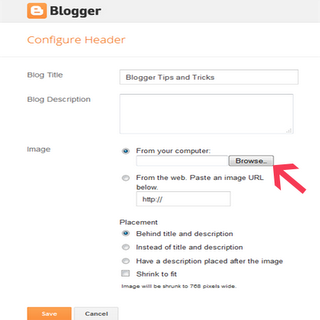


add-blogger-header-image

5) After saved the banner there is ‘Placement’ text is available, and there choose ‘Instead of title and description' then click 'Save'.
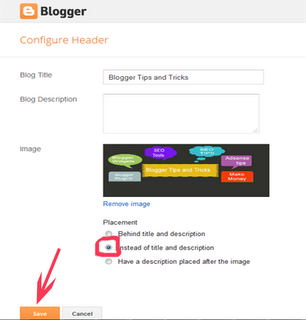

blogger-header-image


Now you can see the Banner image in your blog. This is the simple 5 steps to add your banner in your blog. It’s easy to understand you because we given with screenshots.

I hope this article is very useful for you. If you feel this is better for you please post your comments. We are always welcome to your opinions.

Read more:

Monday, 21 May 2012

How to Move from Blogger to WordPress with old posts

If you have blogging sites like blogger.com, wordpress.com, blog.com etc... All of you have one question raised? How to move Blogger to wordpress?

As we all know Blogger.com is one of the great blogging tool and its one of the Google Company. But, while it comes to blog professionally compared WordPress is ahead.

------------------------------------------------------------------------------------------------------------------------------------------------------
------------------------------------------------------------------------------------------------------------------------------------------------------
Many of the users had started with Blogger as it is for FREE and now they want’s to Move on WordPress because WordPress has many more functionality. Here you can place your adsense and other ads inside your posts more easily.

How-to-move-blogger-to-wordpress
If you are a Blogger user on Blogger.com and desire to move or upgrade your blog to WordPress with your Previous Articles and comments, then follow the below instructions:

Steps to move Blogger.com to wordpress.com
  1. First go to your WordPress Admin Panel.
  2. Navigate to Tools > Import.
  3. Import page you can Select ‘Blogger‘.
  4. On the next page click on ‘Authorize‘ and After that you will be automatically redirected to your Google Account page, and just login in your Account.
  5. Click on ‘Grant Access‘
  6. After give granting Access, you will be redirected to your WordPress Dashboard in ‘Bloggers Blog‘Page.
    Still this completed now just choose the blog which you want to Import. Then click on ‘Import‘.
  7. Once importing process has completed you have to ‘Set Authors‘.

That’s over. I hope it will help you in while moving to Blogger to wordpress.

If you really like this article and if it’s useful for you just give comment for us.

Know more about Adsense:

How to add Google Adsense in Your Blog

If you want to add Google Adsense on your blog you need to have a blog or website so that you can apply for Google Adsense. Once you get accepted in Google Adsense Program you need to focus on a particular niche or keyword and be optimized for search engine traffic. You must need at least 15 to 20 quality posts on your blog or website.

How to add adsense to your blog


Steps to add Google adsense ads to your blog:

1 . First Sign In, to your Google Adsense Account.

2. Go to Adsense Setup >> AdSense for Content >> Select Ad unit or Link Unit >> Copy the Ad code.

3 . Insert the code into your website or blog.

This is the simple steps to add adsense ads in your blog.

Adsense Tips:

Add adsense to your blog

1 . Once you add adsense code after that you want to get traffic to your website. Making money with Google Adsense is all about getting traffic. If you receive more traffic more people will click on the Adsense ads and the more money you will make.

2 . You have to keep posting Targeting your keyword specific content, link building, and advertising.

3 . If you want to Know more about Google Adsense Tricks and articles to make more revenue from your blog or website, you can visit : Adsense tips.

Steps to Add Adsense Ads Below blog title

Here we are explained how to add adsense ads below blog title. If you are blogger user then you might want to increase your adsense revenues, so you can add adsense code in your blogger header part can be really beneficial.

When visitor arrives to your website or blog, they will definitely look at your header and then you might get more clicks (revenues).

Just follow the steps below to add Adsense Ads Below blog title:

1.First Login to your Blogger Account.

Blogger Dashboard Design

2.Then go to ‘Design‘and then ‘Edit HTML‘tab.

Blogger Layout

3.Then take Backup of your full template.

4.After that find the below code given.

5. Find the code given below. You can find it just after </head> tag:

<b:section id=”header” maxwidgets=”1″ showaddelement=”no”>

6. Change maxwidgets=”1″ to maxwidgets=”2″. Also change showaddelement=”no” to showaddelement=”yes” and save your template.

7.Now go to the ‘Page Elements‘ tab and there you’ll see that you can add another widget in your header.

8.Insert your Adsense code and make more revenues.

More about Blogger Search


Best Blogging Sites to Create Your Free Blog

In the modern world more people are taking blogging as a profession other than just a fun or time pass. There are lots of blogging platforms are available to start your blog. Bloggers are increasing day by day and starting their blogs. But, every blog starter has confusion, which is the best blogging and user friendly blogging platform?
There are many free blogging sites available where a user can start his blog, that’s a matter. Here we are providing brief description of most used blogging sites.

1.Blogger.com

I hope you all may be heard about blogger.com if you are using internet for a while. There are lot of advantages for blogger as compared to other blogging sites, because Blogger is a Google company, they providing free blog service to millions of users. Anyone can easily start a free blog with Blogger.

blogger.comFor this you must have a Google account to create your account at Blogger. Blogger provides sub domain to your blog, like (your name).blogspot.com. Blogger.com is a user friendly interface, where a blog beginner can easily find the tools he wants to use.
The major advantage is Blogger blogs can be easily monetized using Google Adsense and other advertisements.

It also provides beautiful templates for your blog, it’s totally free. You can easily upload them to your blog. You can easily edit the whole template and set the width of sidebar, color scheme, adding widgets etc. Once you have a registered domain name, then you can use it with blogger.

2.Wordpress.com:wordpress.comWordPress is best one for self hosted blogs. WordPress also SEO friendly free blogger. Many bloggers are using WordPress as their blogging platform to write. You can easily get widgets and install new plugins in WordPress, too.It is fully customizable.

Engineers are working day and night to create new plugins for WordPress and making work with WordPress easy. You can switch to a custom address (URL) later if you had like. WordPress.com provides an online storage of 3GB to host your blogging service.

3.Tumblr.com:

tumblr.com

Tumblr.com is a good choice for those who are interest in Micro Blogging. I am using Tumblr as a micro blogging service to make a lot of traffic to my blogger.

If you are interested in upload pictures, videos in front of your visitors, then this is best choice for you. This platform is best for small text content blogs, which includes more pictures and less word.

4.Posterous.com:

posterous.com

Posterous is a simple blogging platform, and it has started in May 2008 and was acquired by Twitter on March 12, 2012.

Posterous is a one of the best mobile blogging platform. It is easy to send an email to post new article on your blog. The Posterous servers automatically grab up your post and publish it soon. It has been integrated with social networking sites like Facebook, Twitter, Flickr.

5.Typepad.com :

Typepad.com
TypePad is not a free blogging services. It is a paid service. It provides premium services, widgets, plugins, templates etc. It shows current detailed statistics of your blog visitors.

6.Blog.com:

blog.com
Blog.com is another free blogging site like WordPress.com. Blog uses WordPress software to power their blogs to manage.

But blog have more disadvantages while compared to WordPress. But there are some specialist updates available to make an awesome blog using Blog.com. Blog have Premium upgrade of $30/Year we can put our own ads in blogs.

7.Livejournal.com:

livejournal.com
LiveJournal is another free blogging sites to blogging. Here you can find more features as similar to blogger, WordPress etc. But LiveJournal have many other advantages over other blogging sites.

8.Weebly.com:

weebly.com
Weebly.com is one of the popular blog sites which will help us to create custom design websites. It is very easy drag and drop site builder will help us to create awesome blogs without spending a lot of money.

Sunday, 6 May 2012

5 Steps to Getting the Best Rank in Search Engines

1. Step One: First you have to choose right keyword for web SEO Optimization.

The first thing is you must choose your keywords carefully. This is the first and most important step of SEO. You have chosen keywords that are wrong or ineffective keywords mean it’s an invalid optimization.

You should find popular keywords or niches related to the content of your website, and then know search popularity and competition results of every keyword. Keywords with more popularity and less competition will be your targeted keyword phrases.

Best place to search your keyword: https://adwords.google.com

2. Step Two: Optimize your website ranking factors.

Once you have finished your keyword analysis and selected specific keywords, you should optimize your web site to get better search engine position.

The most important ranking factors are including website title tags, description tags, Meta keyword tags, heading text; link URL, link text, image alt tags, and comment and web page body content text.

You should optimize all these factors are doing carefully. The top 10 ranking website content and ranking factors will give your more help to refer.

5 Steps to Getting the Best Rank in Search Engines

3. Step Three: Submit your website URL to top search engines directories.

After your completion of website optimization then you have to submit your website to Submit all your web sites to Google, Yahoo, MSN, DMOZ and the other major engines.

4 .Step Four: Link Exchange Factor.

Link popularity or Link building is the total number of websites that link to your web site. It is an important method of improving your site's relevancy and place as many engines are using this information as ranking criteria. Both the quantity and quality of link popularity is important to every website. The best "relevant" links from web pages related to your keyword or topic is getting boost to your website.

5. Step Five: Monitoring and reOptimizing your website.

After completion of fourth step, often checking your website search engine position of your targeted keywords, if you are not satisfied with optimization ranking results, you should do more SEO to reach higher search engines ranking position.


Useful Blogger Tips :